Thermal compliance, clearly documented.
H1 thermal calculations for New Zealand building consent.
Build wall, roof, floor, glazing and slab inputs; derive areas from marked-up plans; check H1/AS1 Calculation Method results; and generate source-backed thermal evidence for consent documentation.
Assembly Builder Preview
Try the Assembly Builder
Explore how Thermly builds construction R-values. Use a small sample product set to create assemblies and run indicative H1/AS1 checks.
Preview only: live-project reports require the full product catalogue and source records.
Open calculator previewEarly access
Get early access
Thermly is opening to NZ architects, designers, quantity surveyors, engineers and compliance professionals who prepare or review H1 documentation for building consent.
Built around NZS 4214:2006 construction R-values, H1/AS1 6th edition Calculation Method, calibrated plan take-off, and recorded product source evidence.
The workflow
The full H1 workflow, in one place.
From construction R-values to plan areas, live H1 checks and report-ready evidence.
01
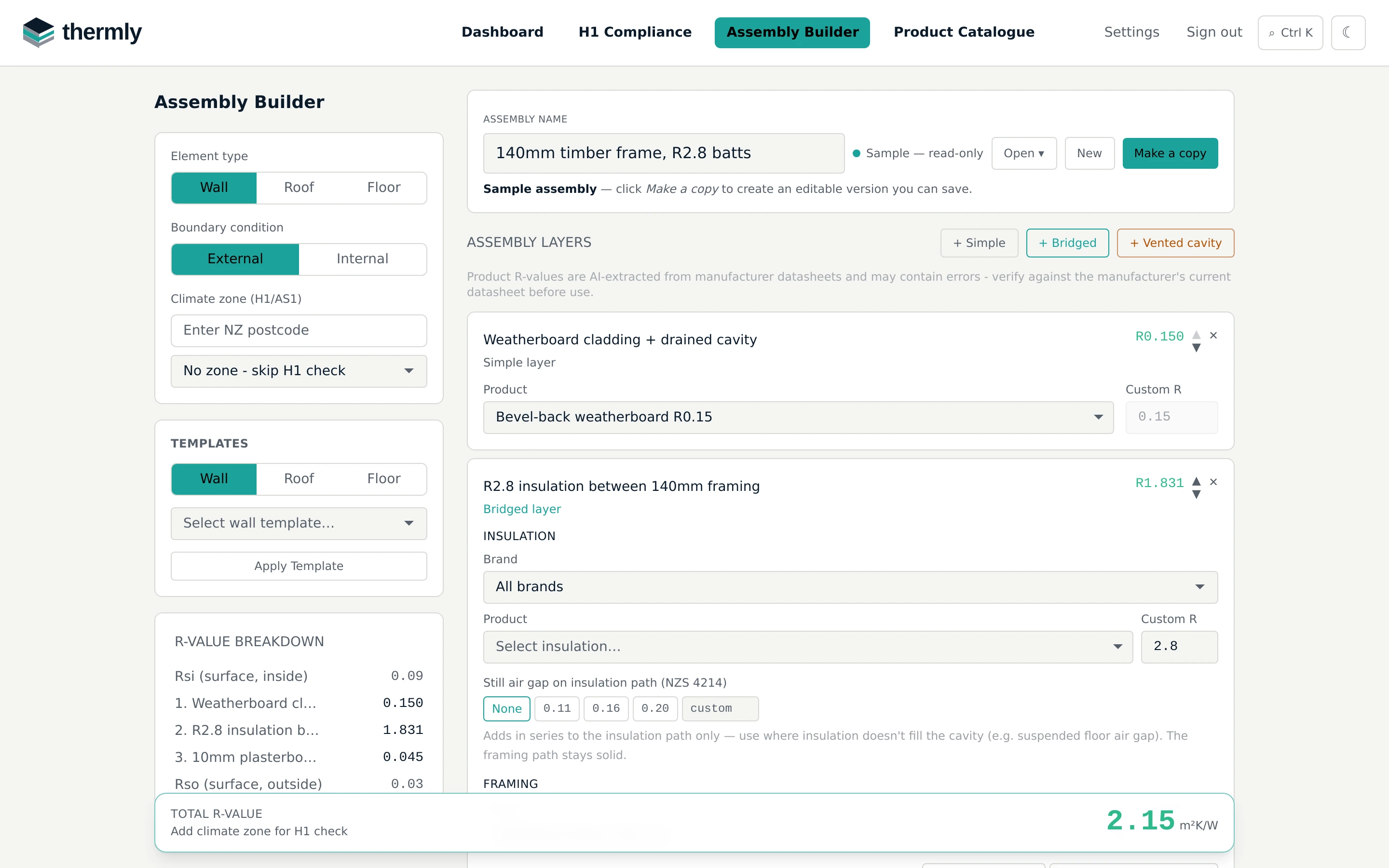
Build up your catalogue of roof, wall and floor assemblies.
Layer up each construction from catalogue products or custom R-values, and save it to reuse across projects. Bridged layers apply the NZS 4214:2006 parallel-path method with the H1/AS1 38% framing default — or use the built-in framing layout calculator to justify a lower fraction from member spacing and noggings. Every layer's contribution is itemised so the result can be reviewed line by line.
Try it in the calculator preview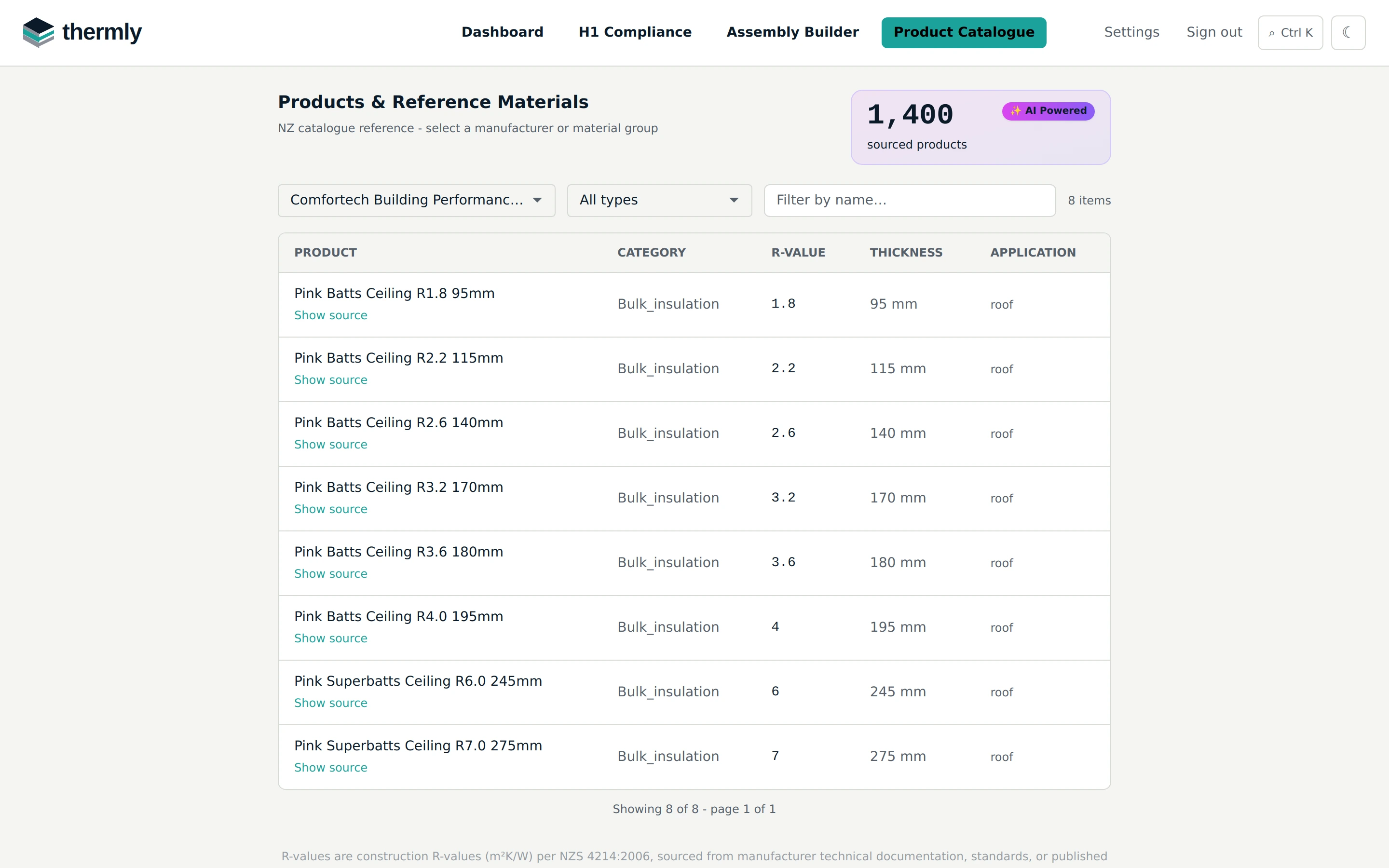
02
Pick products from a sourced NZ catalogue.
Every layer in an assembly selects from 1,400+ manufacturer products and reference materials, with R-values, thicknesses and applications. Each record links back to a manufacturer datasheet, BRANZ/NZS reference, or published table so assumptions can be checked before submission.
Thermly is built as an end-to-end V6 H1 compliance workflow: sourced product data, R-value assemblies, calibrated plan take-off, H1/AS1 heat-loss checks and report-ready evidence stay connected in one project record. Thermly is independent and is not affiliated with, endorsed by, or sponsored by the product manufacturers listed.
03
Trace areas from the plan.
Use the plan PDF directly: let Thermly scale it automatically, or calibrate each axis manually from a known dimension. Trace elements as polygons with snapping and precise length entry, or measure walls as lines or polygons. Areas are calculated from the markup and synced directly to the relevant H1 row.
04
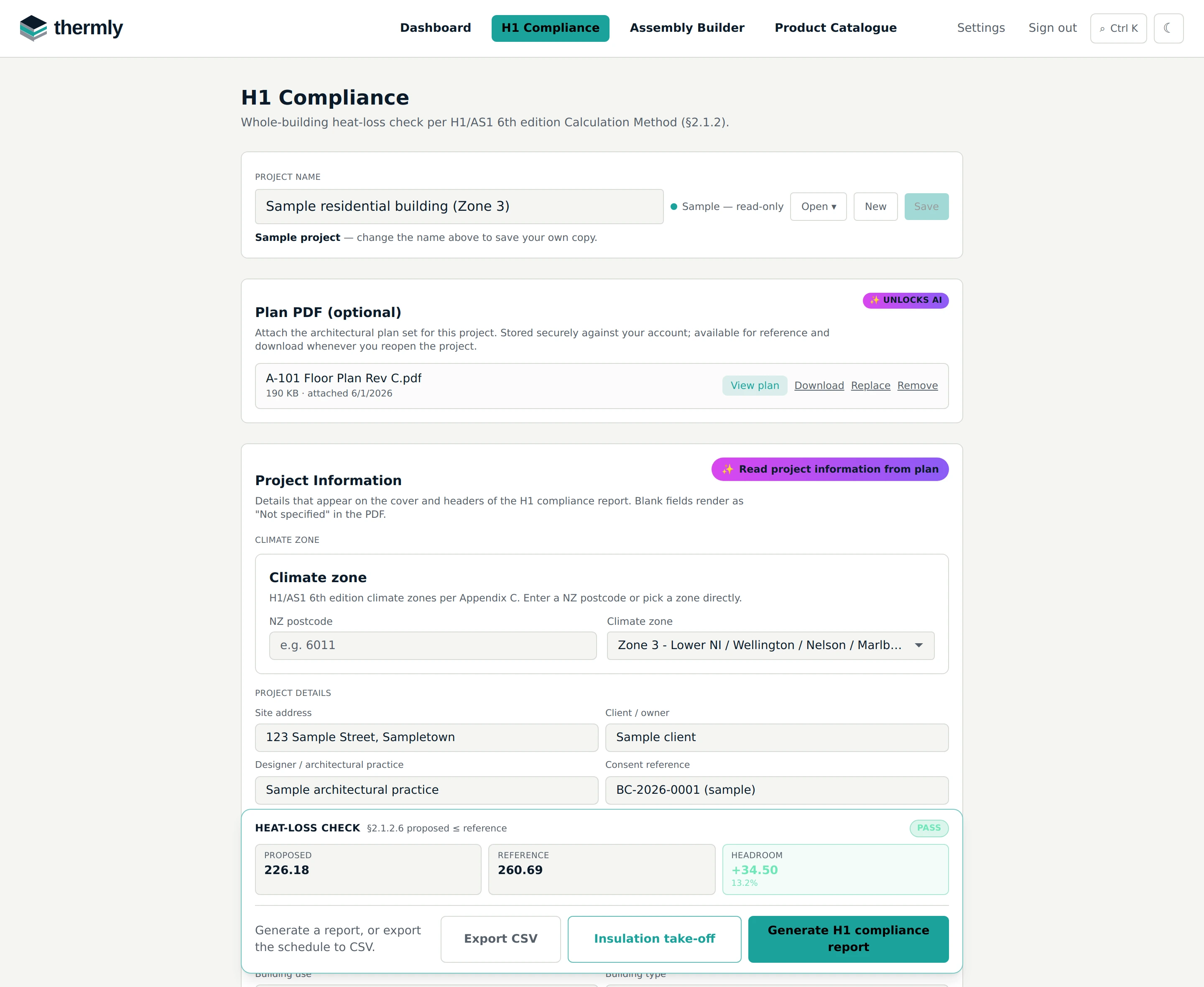
Check heat loss as you build the envelope.
The H1/AS1 Calculation Method check updates live as the envelope is entered — proposed vs reference heat loss, headroom, and per-element minimums — with one-click H1 report, insulation take-off and CSV exports when it passes.

05
Generate the report. Evidence, not just a number.
The H1 report sets out the proposed and reference building heat-loss tables with the equations behind every figure, per-element minimum R checks, assembly build-ups, marked-up plan extracts, and a references page citing the standards and manufacturer datasheets behind each value — so a processing officer can trace every assumption.
Insulation take-off and CSV schedule exports come from the same inputs.
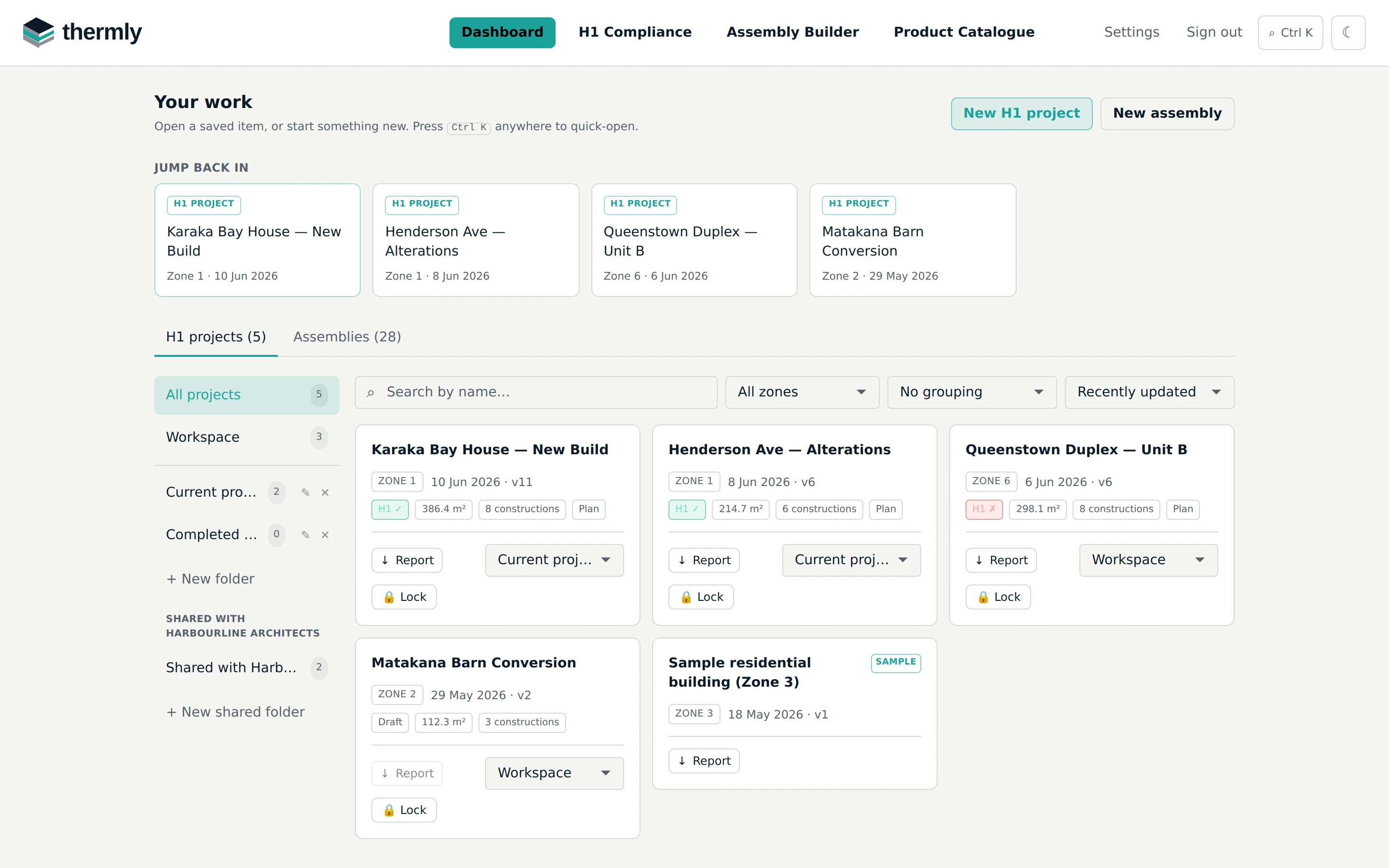
Every project, one dashboard.
Organised, shared, and searchable.
File projects and assemblies into folders, and share them with your organisation — teammates get role-based access and co-edit safely with one editor at a time, so nothing is ever overwritten. Each card shows the live H1 status, envelope area and whether a plan is attached.
Search and filters cover every project and assembly — or press Ctrl K anywhere in the app to jump straight to any project, assembly or page.
Capabilities
Built for the full H1 compliance workflow.
Thermly brings the H1 thermal workflow into one place: construction R-value assemblies, sourced product data, postcode-based climate zones, calibrated plan take-off, AI-assisted plan reading, H1/AS1 Calculation Method checks, and PDF-ready supporting records.
- 01
Build construction R-value assemblies
Layer up walls, roofs and floors with simple and bridged layers, including framing fractions, surface resistances and NZS 4214:2006 calculations.
- 02
Use sourced product data
Select insulation, lining, cladding, slab and reference materials from a catalogue with source documents, retrieval dates and manufacturer data trails.
- 03
Check H1/AS1 Calculation Method results
Enter envelope areas, glazing, doors, slabs and floors to compare proposed heat loss against the H1/AS1 reference building.
- 04
Mark up plans and derive areas
Attach plan PDFs, calibrate scale, draw element polygons, and sync measured take-off areas back into H1 rows.
- 05
Read plans with AI assistance
Pull project information, window and door schedules, and insulation specifications straight from uploaded plan PDFs to pre-fill your H1 inputs, ready to review and adjust.
- 06
Look up climate zones, windows and slabs
Use postcode climate-zone lookup plus table-based helpers for glazing and slab-on-ground R-values.
- 07
Save assemblies and project evidence
Reuse common assemblies, keep versions as designs change, and maintain a record of the assumptions behind each result.
- 08
Generate report-ready evidence
Produce thermal resistance certificates, H1 reports and calculation summaries with marked-up plan extracts, professional details and source-backed assumptions.
- 09
Work as a team
Share projects and assemblies across your organisation, invite colleagues with roles, and co-edit safely with one editor at a time so work is never overwritten.
Also built in
- Save and reuse common assemblies across projects.
- Keep project calculations versioned as designs change.
- Derive H1 areas from calibrated plan mark-ups.
- Include marked-up plan extracts in generated reports.
- Personalise certificates with your professional details.
- Export by PDF or email.
- Use Thermly on desktop, tablet or phone.